Powered by Outside

Picture Guide. How to add Pink-Bike Pictures to a Pink-Bike Thread

PB Forum :: Tutorials
Picture Guide. How to add Pink-Bike Pictures to a Pink-Bike Thread

If you are looking for support please visit the Trailforks Help Center or the Pinkbike Help Center.
Trailforks/Pinkbike staff does occasionally check these forums, but this is mainly for other users to help each other.
Author Message
Posted: Dec 13, 2009 at 7:36 Quote
Many people ask the same question.

How do I add my Pink-Bike pictures to a Pink-Bike Thread?

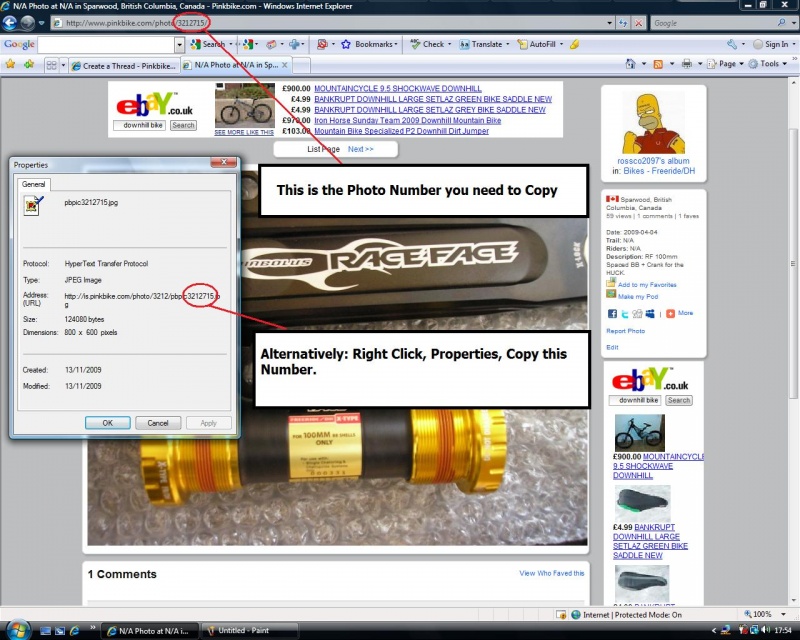
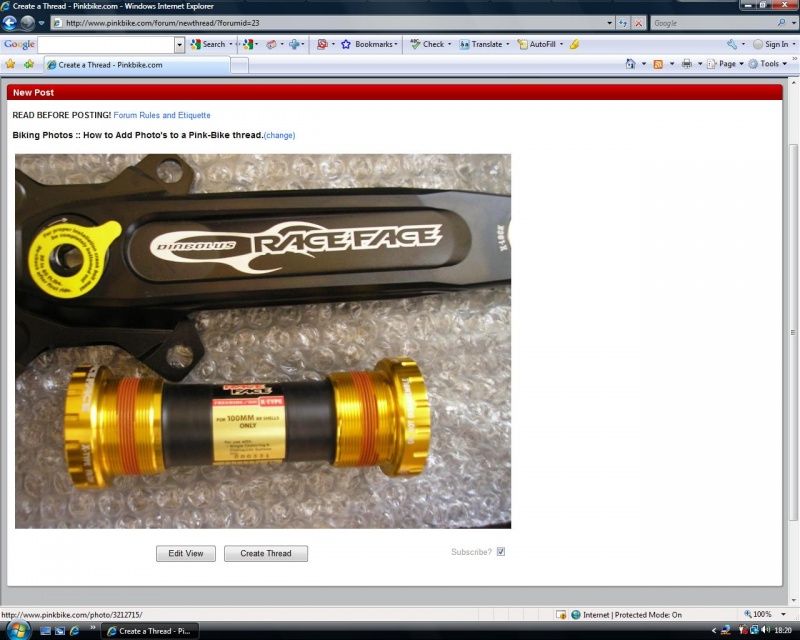
First of all. Click onto your already uploaded picture.

Now either select the PB code from the address bar or, Right click and select from the Properties pop-up.

photo

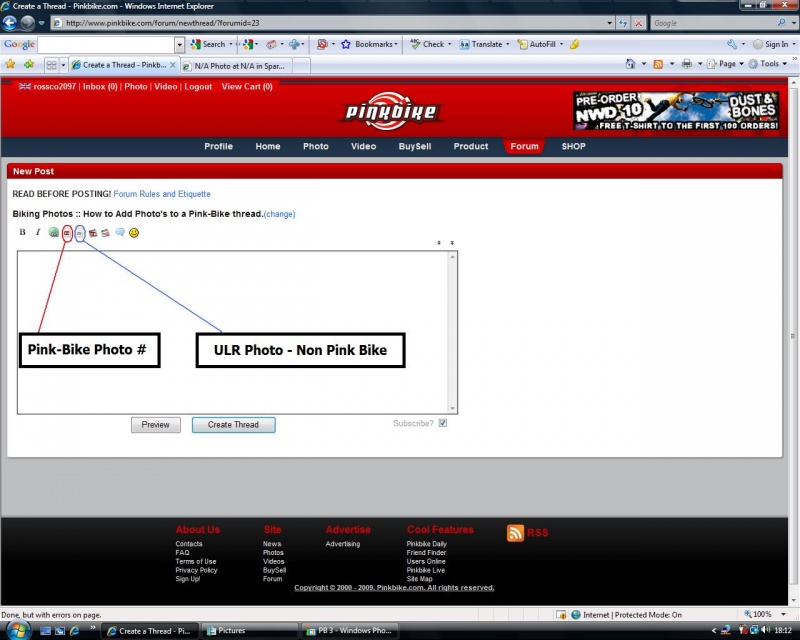
Now on the thread page, Click on the PB image Icon (You may need to Temp Allow scripted summit)

Ignore the ULR up-load button.

photo


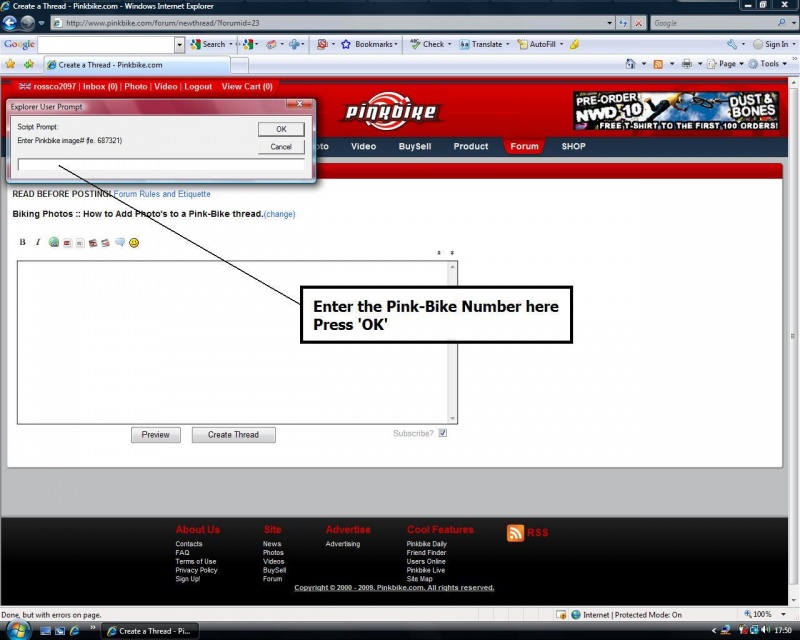
Script promp window, Paste the PB number in there. Press OK.

photo

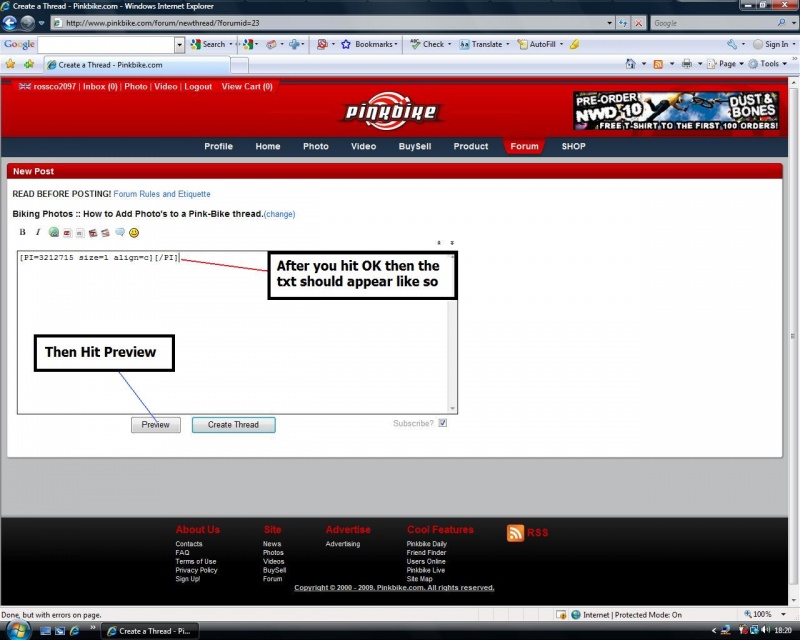
Should look like this ... Hit the Preview Button, Preview the Pic making sure it works

photo

Bish Bosh ... Picture is ready to be added to the wealth of Info on PB.

photo

Now Exit Preview and keep typing/adding or Hit Create thread/Add reply button to Submit. Salute Salute Salute

Posted: Dec 16, 2009 at 13:40 Quote
Good guide it'll help people who don't know how to do it tup

Posted: Mar 3, 2010 at 8:21 Quote
Pink Bike photos will soon be showing metadata and copyright info and it's important to make sure that you add your copyright and contact info to your photos before you upload them. I created a blog post about it if you need more info. And remember if it's not your photo it's illegal to put your info on it, and don't post it if you don't have permission from the photographer.

Posted: Mar 7, 2010 at 15:41 Quote
You can also right click on a PB photo, copy its link and paste it in the URL("non-pinkbike") photo choosing thing, better for me, less clicks, and typing/erasing

Posted: Jul 21, 2011 at 4:34 Quote
when we are Quoting a post, how can we put them in small size or thumb size??

For example:

[Quote="XXXX"][P=XXXX.jpg size=m align=c][/P]

I´ve tried to replace size=m by size=s but the picture gets bigger... How to change the code?!??!

Posted: Apr 25, 2012 at 22:35 Quote
How do I get photos from my iPhone onto my PB profile?

Posted: Apr 26, 2012 at 7:35 Quote
socalbomber wrote:
How do I get photos from my iPhone onto my PB profile?

email them to [email protected] from the same email as you have on your profile

Posted: Jul 28, 2012 at 10:29 Quote
[Quote="kurtSoares"]when we are Quoting a post, how can we put them in small size or thumb size??

For example:

XXXX wrote:
[P=XXXX.jpg size=m align=c][/P]

I´ve tried to replace size=m by size=s but the picture gets bigger... How to change the code?!??!

I would like to know this as well. I have emailed PB, but no response. I can get thumnails with 's', and everything else does not work, or is quite large...

Posted: Nov 7, 2012 at 12:08 Quote
[Quote="bigd003"]
kurtSoares wrote:
when we are Quoting a post, how can we put them in small size or thumb size??

For example:

XXXX wrote:
[P=XXXX.jpg size=m align=c][/P]

I´ve tried to replace size=m by size=s but the picture gets bigger... How to change the code?!??!

I would like to know this as well. I have emailed PB, but no response. I can get thumnails with 's', and everything else does not work, or is quite large...

I would like to know the answer to this. I have searched for it all over but haven't found any usefull info.

Posted: Aug 29, 2013 at 0:20 Quote
This helps - getting familiar to this forum - thanks.

Posted: May 26, 2014 at 0:08 Quote
This is a great job. It's very helpful who don't know how to it. Actually I also learn to see these. Thanks a lot...

Posted: Nov 10, 2014 at 8:17 Quote
Great post - very helpful. How does one post side-by-side images, as we often see in the Photo Epics (like this one: https://www.pinkbike.com/news/sram-new-zealand-adventure-2014.html) Thanks for your help.

Posted: Dec 1, 2014 at 12:20 Quote
How to add pictures from Iphone ??

  • Previous Page
  • Next Page

 
Your subscriptions
no posts


Copyright © 2000 - 2026. Pinkbike.com. All rights reserved.
dv65 0.019958
Mobile Version of Website